How to Correctly Fill Out a Debt Snowball Worksheet.Back in late 2013, I found myself staring blankly at three separate browser tabs: my Chase credit card account, an Ally auto loan portal, and a Nelnet dashboard showing thousands in federal student loans. My total balance across them hovered around $43,000. I felt buried.
- 1. 1. Understanding the Debt Snowball Framework in Digital Tools
- 2. Spreadsheets vs. Dedicated Software
- 3. 2. Preparing Financial Data Before You Fill Out the Sheet
- 4. Typical US Debt Categorization Table
- 5. 3. Step-by-Step Guide to Filling Out the Worksheet Correctly
- 6. Step 1: Input Raw Data Without Sorting
- 7. Step 2: Execute the Balance Sort
- 8. Step 3: Sum the Minimums Baseline
- 9. Step 4: Program the Snowball Distribution Logic
- 10. 4. Real-World Scenarios: Managing Income Fluctuations and Variable Rates
- 11. Variable APR Fluctuations
- 12. Handling Gig-Economy or 1099 Incomes
- 13. 5. Common Pitfalls When Using Debt Spreadsheets
- 14. Mixing Avalanche and Snowball Mechanics
- 15. Forgetting About Minimum Payment Reductions
- 16. Ignoring Daily Interest Accrual
- 17. 6. Hands-On Tips for Maintaining and Automating Your Worksheet
- 18. Use Conditional Formatting for Milestone Feedback
- 19. Linking Worksheets to Automated Bank Feeds
- 20. Frequently Asked Questions
- 21. How do I handle 0% promotional APR balance transfers on a debt snowball worksheet?
- 22. Should I include my mortgage or home equity line of credit (HELOC) on this sheet?
- 23. What happens to my debt snowball worksheet when a minimum payment drops automatically?
- 24. Is a Google Sheets debt snowball better than mobile apps like Undebt.it or Debt Payoff Planner?
- 25. How do I incorporate federal student loans that are currently in an income-driven repayment (IDR) plan?
Like many people, I printed out a generic one-page sheet I found online. Within two weeks, I spilled coffee on it, lost track of an updated statement balance, and gave up.
Everything changed when I treated debt payoff like a software problem. Moving the process into a responsive spreadsheet completely altered my trajectory. When you model the math properly, tracking your numbers becomes an active, motivating feedback loop rather than a monthly exercise in dread.
Whether you are building your own sheet from scratch or working off a custom Google Sheets financial template, here is how to configure, populate, and maintain your debt snowball tracker without making the classic mistakes that derail most budgets.



1. Understanding the Debt Snowball Framework in Digital Tools
The debt snowball method is straightforward: you arrange debts from the smallest balance to the largest, regardless of the interest rates. You throw every spare dollar at the smallest balance while paying the baseline minimum monthly payment on everything else. Once that first balance hits zero, you take its entire payment and roll it over into the next smallest debt.
This strategy gained mass popularity through Dave Ramsey’s baby steps (specifically Baby Step 2). Financial purists often argue against it because the debt avalanche comparison shows you save more money mathematically by targeting the highest credit card APR first.


Here is what the pure math leaves out: humans are emotional creatures.
💰 More Cheap Living Tips You'll Love
- How Long to Pay Off Debt? Tech Tools to Find Out Fast
- First Steps to Take When You Decide to Get Out of Debt
- Pay Off Debt Faster Without Earning More: Tech Guide
- Debt Avalanche Method Step by Step: Fast Debt Payoff
- Debt Snowball Method: How It Works (With Real Example)
- Debt Snowball vs Avalanche: Which Repayment Strategy Wins?
Knocking out a $450 medical bill in your first month gives you an immediate shot of dopamine. Paying $450 toward a $28,000 private loan at 11% APR barely moves the needle visually, which makes it easy to burn out and quit.


Spreadsheets vs. Dedicated Software
People often ask me about the best debt snowball app vs spreadsheet debate. Apps like Undebt.it, YNAB, or Debt Payoff Planner are convenient, but they run on rigid codebases. A custom Microsoft Excel debt tracker or Google Sheet offers distinct advantages:
- Total Data Ownership: Your financial records stay on your local drive or private cloud account without exposing bank credentials to third-party data aggregators.
- Formula Flexibility: You can adjust formulas to accommodate unexpected US tax refund windfalls, bi-weekly pay schedules, or sudden interest rate changes.
- No Subscriptions: Paying a monthly SaaS fee to track consumer debt you are trying to escape is an irony I prefer to avoid.
If you prefer analog methods, you can start with a free printable debt payoff tracker pdf to sketch out the numbers, but digital sheets do the heavy computational lifting once payments start cascading.
2. Preparing Financial Data Before You Fill Out the Sheet
Do not touch your spreadsheet until you have your raw numbers organized. Opening a workbook without your paperwork ready leads to inaccurate data entry and broken formulas.
Log into your accounts and pull up your latest monthly statements. In the US banking ecosystem, statement closing dates rarely align, so make sure you are pulling numbers from the most recent statement cycle within the current month.
You need three critical data points for every single liability:
- Total loan balance: The absolute payoff amount as of today (not the original principal).
- Credit card APR or loan interest rate: The nominal annual rate listed on page 2 or 3 of your statement.
- Strict minimum monthly payment: The non-negotiable floor required to keep the account in good standing.
Typical US Debt Categorization Table
| Account Type | Example Creditors | What to Look Out For | | :— | :— | :— | | Revolving Credit | Chase, Discover, Citi, Amex | Variable APR shifts based on Federal Reserve benchmark adjustments | | Installment Debt (Auto) | Ally, Capital One Auto, Credit Unions | Fixed monthly payment amounts; check for early payoff prepayment penalties | | Federal Student Loans | Nelnet, Aidvantage, MOHELA | Dynamic minimums under income-driven repayment plans (like the SAVE/IDR plans) | | Personal / Medical | CareCredit, Local Hospital Billing | Zero-interest promotional windows that jump to deferred APR if missed |
Once you have these figures, you need to determine your “Snowball Accelerator”—the surplus capital you can put toward debt each month. This requires a quick pass through your zero-based budgeting calculations.
If your take-home pay is $4,500, your baseline living expenses (rent/mortgage, utilities, food) are $3,000, and your collective minimum debt payments are $800, you have a baseline surplus of $700. That $700 is the fuel that powers your snowball.
3. Step-by-Step Guide to Filling Out the Worksheet Correctly
Let us walk through the step by step debt snowball worksheet instructions using either a pre-built debt snowball worksheet excel template or your own clean spreadsheet.
Step 1: Input Raw Data Without Sorting
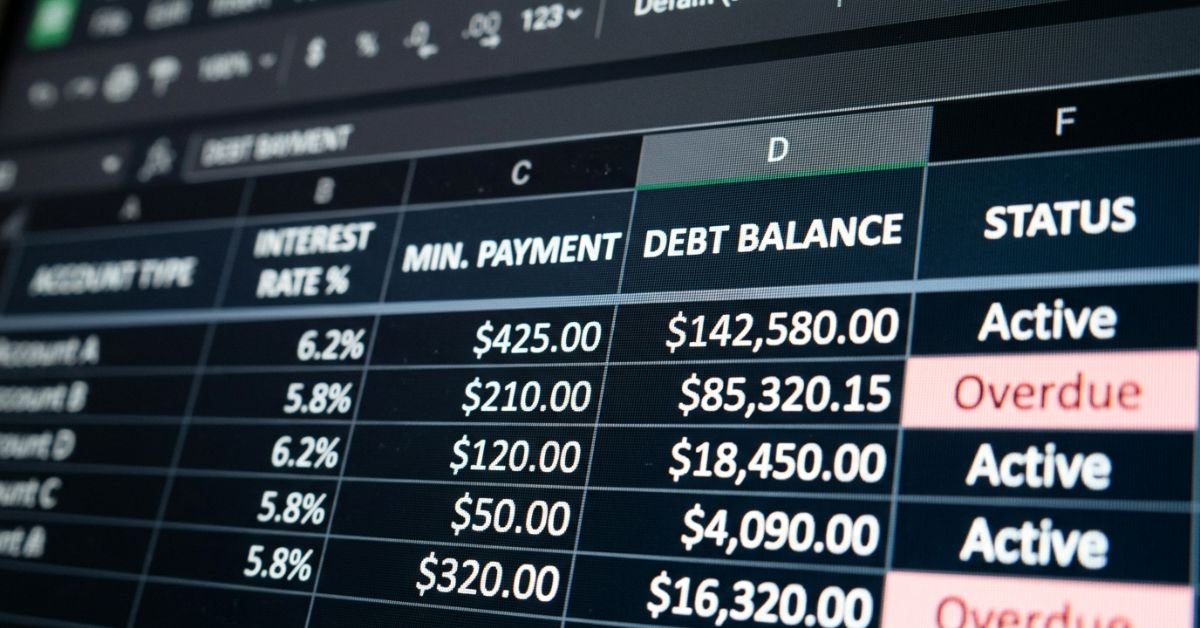
Create five core columns:
- Column A: Creditor Name
- Column B: Current Balance
- Column C: Interest Rate (APR)
- Column D: Minimum Monthly Payment
- Column E: Actual Monthly Allocation
Enter every liability you have. Do not include your primary residential mortgage here; standard snowball systems treat home financing as a later financial goal.
Step 2: Execute the Balance Sort
Select your data array (excluding the header row) and run a data sort.
- Sort by: Column B (Balance)
- Order: Ascending (Smallest to Largest)
This is where people following the snowball method stumble: do not sort by interest rate. If you have a $600 department store card at 28.99% and a $400 medical bill at 0%, the $400 medical bill takes the top slot. This is how you follow the classic blueprint when learning how to fill out dave ramsey debt snowball form correctly.
Step 3: Sum the Minimums Baseline
At the foot of your minimum payment column (Column D), write a standard sum formula: =SUM(D2:D10)
This total represents your non-negotiable monthly debt obligations. You must pay this number every month to avoid late fees, penalty APR bumps, and credit bureau hits.
Step 4: Program the Snowball Distribution Logic
In your first payment iteration, populate Column E (Actual Monthly Allocation):
- For debts in rows 3 through 10 (the larger debts), set Column E equal to Column D:
=D3,=D4, and so forth. - For row 2 (your smallest balance, Debt #1), add your snowball surplus to the minimum:
=D2 + 700(substituting your actual surplus budget).
[Row 1 Headers]  | Balance | Min Pay | Snowball Allocation
[Row 2 - Target] | $400    | $35     | =D2 + $700 ($735 total)
[Row 3 - Next]   | $1,200  | $60     | =D3 ($60 total)
[Row 4 - Hold]   | $4,500  | $140    | =D4 ($140 total)
In this setup, Debt #1 is paid off in month one. In month two, its entire $735 allocation rolls into Debt #2, bumping Debt #2’s monthly payment from $60 to $795.
Expert Insight: Preventing Circular References in Dynamic Sheets
If you are building a multi-month google sheets debt snowball calculator with extra payments, avoid pointing formulas backward to previous variable cells. Instead, build an independent amortization schedule matrix on a secondary tab. Use an=IF(Previous_Balance <= 0, 0, Target_Payment)logic flag. This keeps your formulas clean and prevents workbook-crashing circular references as balances clear out.
4. Real-World Scenarios: Managing Income Fluctuations and Variable Rates
Static spreadsheets assume your life runs on an unvarying schedule. In reality, interest rates bounce around, quarterly commissions hit, and cars need unexpected repairs.
Variable APR Fluctuations
Most US credit cards use variable APRs tied directly to the Wall Street Journal Prime Rate. Over the last few years, a card that started at 16.24% might have climbed past 24.99%.
If you use a static spreadsheet, your projected debt-free date will drift out of sync with your actual accounts.
- The Fix: Create an explicit
APR_Updatecolumn in your spreadsheet. Use that column to dynamically calculate the approximate monthly finance charge:Monthly Interest = (Balance * (APR / 365)) * 30 - Review your statements once a month on a set date (like the 1st or the 15th) to update these rates.
Handling Gig-Economy or 1099 Incomes
If you work freelance, run an Etsy store, or drive for Uber/DoorDash, your cash flow fluctuates.
Do not hardcode optimistic extra payments into your sheet. Instead:
- Set your base snowball payment using only your guaranteed baseline income.
- Create a separate cell titled
Unscheduled Cash Injection. - When a good month hits, deposit those variable earnings into a high-yield savings account (HYSA) first. Once the payment clears, route that capital into your
Unscheduled Cash Injectioncell to pull your payoff timeline forward without risking an overdraft on regular expenses.
5. Common Pitfalls When Using Debt Spreadsheets
I have broken my share of debt payoff templates over the years. Watch out for these four common traps:
Mixing Avalanche and Snowball Mechanics
Halfway through the year, you might look at your sheet and realize your auto loan sits at 4.5% while your student loan is at 6.8%. You will feel an urge to redirect extra cash to the higher-rate loan.
Resist this tweak. Splitting your extra payments across multiple accounts slows down your progress on both, neutralizing the psychological boost that makes the snowball method work in the first place. Pick one methodology and stick with it through the finish line.
Forgetting About Minimum Payment Reductions
As revolving balances shrink, credit card issuers automatically lower your minimum monthly payment floor (often calculating it as 1% of the balance plus assessed interest, or a flat $25–$35).
If your minimum drops from $110 to $45, do not reduce what you send them. Keep sending the original baseline amount. If you let that money slip back into your checking account, it will get absorbed by daily spending instead of knocking down your balance.
Ignoring Daily Interest Accrual
Many pre-built spreadsheet templates treat loans like simple subtraction engines: Balance - Payment = New Balance.
Installment loans and credit cards accrue interest daily. If you do not account for that monthly finance fee, your sheet’s balance will show $0.00 while your loan provider still shows a remaining balance of $48.12. Always verify your real balance against your live dashboard before declaring an account dead.

6. Hands-On Tips for Maintaining and Automating Your Worksheet
A financial tracker is only useful if you actually keep it up to date. Here are a few ways to keep maintenance simple and rewarding:
Use Conditional Formatting for Milestone Feedback
Humans respond well to visual milestones. Set up a simple conditional formatting rule across your debt rows:
- Condition: Format cells if cell value is equal to
0(or<= 0). - Formatting: Apply a light green background fill with a strike-through on the text font.
The visual feedback of watching an entire row turn green and strike out provides a noticeable psychological lift. It proves your budget is working.
Linking Worksheets to Automated Bank Feeds
If manual data entry feels like a chore, you can connect your sheet to bank data feeds using tools like Tiller HQ or personal finance add-ons that run on the Plaid API.
These services pull daily cleared transactions into a raw data tab in your Google Sheet or Excel file. From there, a straightforward SUMIFS formula can aggregate your actual payments and update your debt snowball worksheet automatically.
If you prefer to enter transactions manually, set a repeating calendar reminder for the 1st of every month. Brew a cup of coffee, sit down with your latest statements, and spend fifteen minutes updating your balances.
Frequently Asked Questions
How do I handle 0% promotional APR balance transfers on a debt snowball worksheet?
Treat the balance transfer card based strictly on its outstanding dollar balance, exactly like any other account on your sheet. However, add an adjacent note column containing the exact promotion expiration date. If your snowball timeline will not pay off that balance before the promotional window closes and triggers a rate hike, you may need to temporarily adjust your priority to clear that balance before the higher interest rate kicks in.
Should I include my mortgage or home equity line of credit (HELOC) on this sheet?
Do not include your primary mortgage; long-term real estate loans belong in later financial phases because their balance size can stall out your snowball for years. A HELOC falls into a gray area. If the HELOC balance is under $15,000 and can be cleared within 12 to 18 months, include it in your sheet. If it is a larger second mortgage, focus on your non-mortgage consumer debts first.
What happens to my debt snowball worksheet when a minimum payment drops automatically?
Freeze your baseline commitment. If your credit card statement drops your required minimum payment from $85 down to $40 because you paid down a big chunk of principal, keep sending that original $85. In your spreadsheet, leave the baseline payment row at its starting figure so that freed-up money stays pointed at your debt.
Is a Google Sheets debt snowball better than mobile apps like Undebt.it or Debt Payoff Planner?
Google Sheets wins on privacy, long-term stability, and flexibility. Dedicated mobile apps offer slick interfaces, push notifications, and automatic sorting, but they can lock useful features behind paywalls or shut down entirely. A cloud spreadsheet lives indefinitely in your personal drive, works offline, and lets you modify formulas whenever your financial situation shifts.
How do I incorporate federal student loans that are currently in an income-driven repayment (IDR) plan?
List each loan group (such as Loan Group AA, AB, etc.) as an individual row if your servicer lets you target them independently. If your IDR or SAVE plan calculates your minimum payment as $0.00, record the minimum payment as $0.00 on your sheet. Place it in the list based on its current balance. If it lands at the top of your snowball order, roll your surplus payment directly into it to begin knocking down the principal balance.